
MailRouter: Intelligent Email Routing
Automation of Invoice Categorization and Routing
Intelligent solution for automatic routing of incoming emails in a shared accounting mailbox based on purchase order numbers, OCR analysis of PDF attachments, and configurable rules.

Customer Profile
BK, a.s. is an established company operating in the field of technical building services and facility management with over 25 years of history and a portfolio of clients from significant corporate and institutional customers. We implemented the MailRouter project for the company's accounting department, which daily processes large volumes of incoming email communication – invoices, purchase orders, and related documents from dozens of suppliers.
A solution of this type is relevant for any organization whose accounting or back-office department operates with a shared email mailbox serving as the entry point for document workflow.
The Challenge
The accounting department faced a growing volume of incoming emails, whose processing exceeded the capabilities of native Outlook rules and represented a significant administrative burden for department staff. While these rules allow basic sorting by sender or keywords, they cannot dynamically respond to purchase order numbers, work with PDF attachment content, or assign emails to specific responsible employees based on internal company data.
The project goal was to build an intelligent solution that automatically identifies the correct recipient for each incoming email – based on message content, purchase order number, or configurable rules. It was also important to ensure that the team could manage these rules independently, without relying on IT support.
Implementation
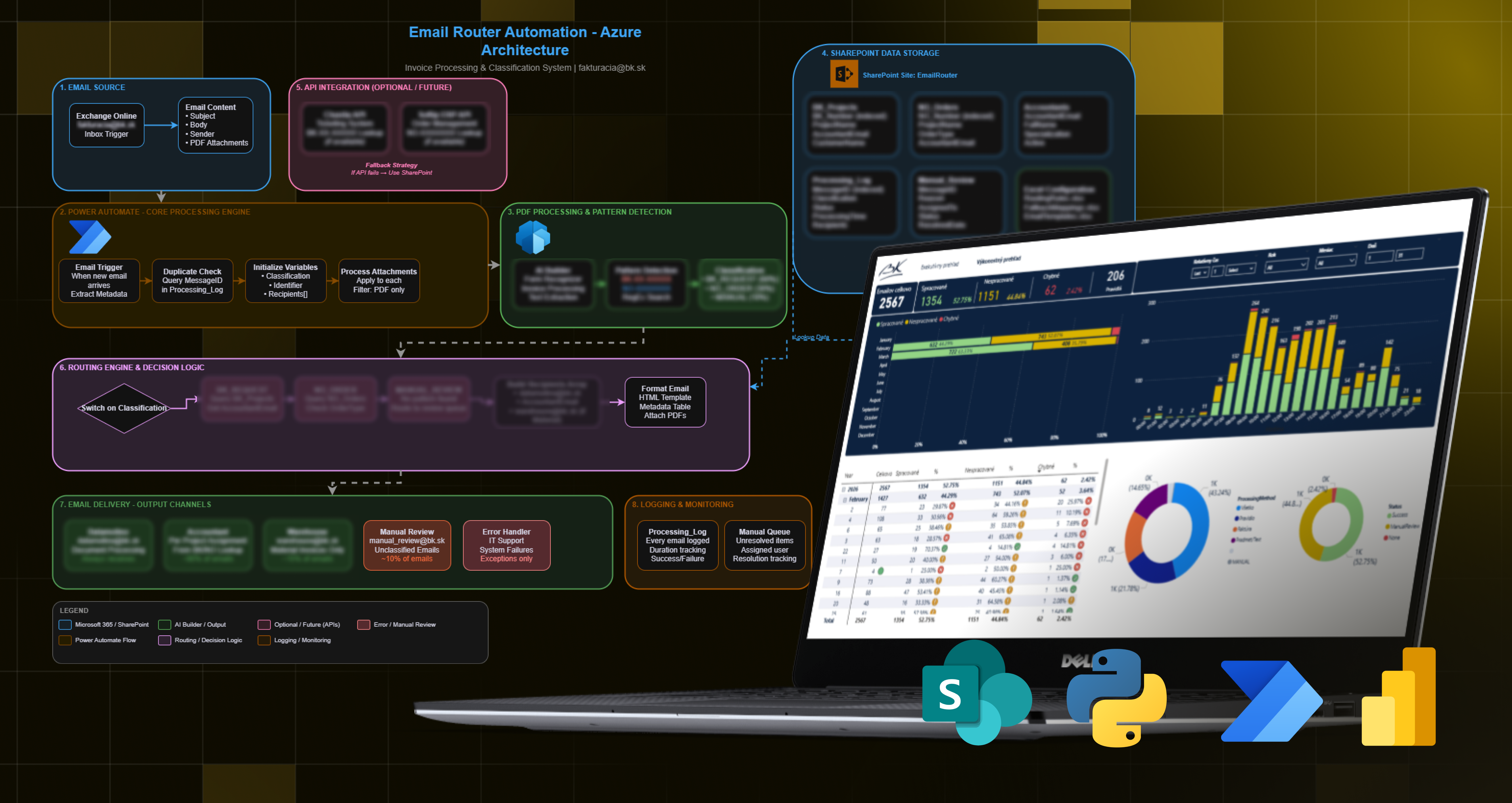
We designed and implemented an automated flow in Microsoft Power Automate that processes each new incoming email in the shared mailbox. The solution works in three logical layers:
Purchase Order Number Recognition
The flow scans the email subject and body in real-time and searches for the purchase order number. When found, the email is immediately routed to the correct recipient – based on the purchase order number and a query to the internal ordering system. Through direct system integration, it identifies the responsible accountant and adds the project name.
OCR Invoice Processing
If the purchase order number is not found directly in the email text, the flow automatically initiates OCR analysis of attached PDF files through an Azure Function. This function can process multiple invoices at once, extract relevant identifiers, and ensure correct routing even without explicit number mention in the email text.
Static Rules via SharePoint
As a backup layer, routing rules are managed by the team directly in a Microsoft SharePoint list – without any intervention in the flow itself. The flow dynamically loads these rules from the SharePoint list, which allows defining various condition combinations based on sender, subject, or email body, as well as rules based on searching for information directly in processed PDF documents. Rules can be easily added or edited.
All processed emails are logged in SharePoint, providing full auditability and overview of each processed email – including the method used, recipient, and processing status.
Results
Key Benefits
Processing Automation
Emails are routed automatically based on content, purchase order number, or defined rules – without manual intervention.
Reliable Processing Logic
The combination of text analysis, OCR, and rules ensures high automation success rate.
Simple Rule Management
The team manages rules independently through Microsoft SharePoint, without IT dependency.
Auditability
Every email is recorded including processing method, recipient, and status.
Reporting
The overview in Microsoft Power BI enables tracking automation success and identifying improvement opportunities.
Next Steps
Going forward, it makes sense to focus on reducing the share of emails requiring manual processing, primarily through continuous rule expansion based on analysis of unprocessed messages.
The next step is deploying more advanced classification for emails without clear identifiers, as well as expanding OCR capabilities for additional document types. There is also room for integration with other internal systems.
Tools Used
Ready for similar results?
Ready to achieve similar results? Let's discuss your project and find the right solution.
Start Your Project